The right access for every role on the hiring team.
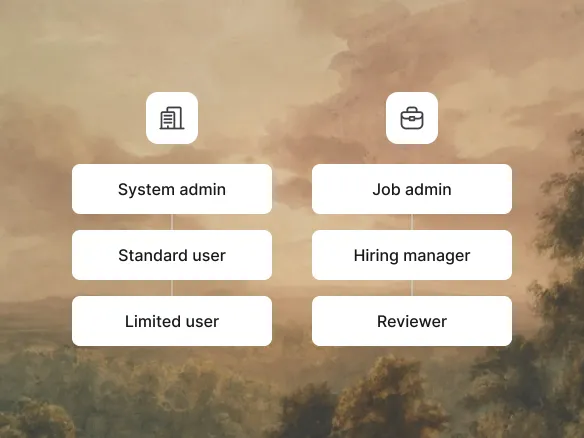
A two-tier role model: three company-wide roles and three
per-job roles. Unless you're a system admin, you only see the
jobs and candidates for which you have a job-level role.
Simple to reason about, easy to change.
At the company level: System admin (full access to everything),
Standard (sees jobs they're added to), Limited (most restricted).
At the job level: Job admin (owns the role), Hiring manager
(decides on the hire), Reviewer (interviews and rates). The two
axes combine: a person's company role sets the floor; their job
role sets what they can do on each specific role.
Company role sets the access floor across the workspace
Job role defines what each person can do on each specific
role
Two axes combine for fine-grained, easy-to-reason-about
control
02
Per-job scoping. No cross-team leak.
Unless you're a system admin, you only see the jobs and candidates
for which you have a job-level role. The marketing team's pipeline
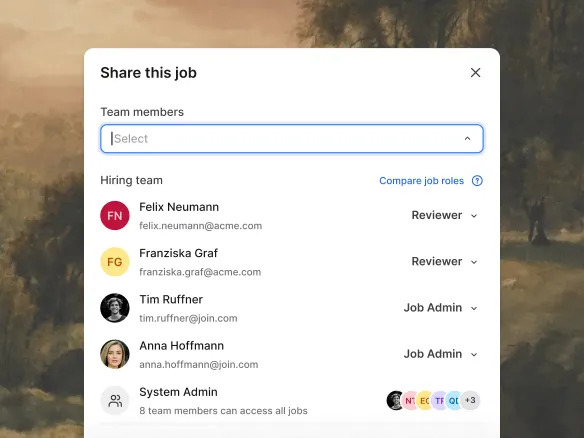
isn't visible to engineering, and vice versa. Inviting someone to
a role grants them access to that role's candidates; removing them
ends it. No global candidate visibility, no accidental cross-team
leak.
Users see only the jobs they're explicitly added to
Inviting to a role grants access; removing ends it
immediately
No global candidate visibility or accidental cross-team
exposure
WHAT YOU CAN DO
A permission model built for real hiring teams.
Two-tier role model
Company-wide role (Admin / Standard / Limited) sets the
floor; per-job role (Job admin / Hiring manager / Reviewer)
sets what a person can do on each specific role.
Per-job access
Outside of system admins, users see only the jobs and
candidates for which they have a job-level role. No
cross-team leak by default.
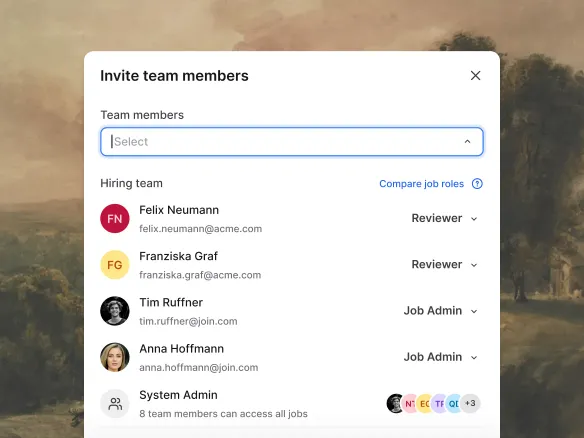
Invite external collaborators to one job
Give an external recruiter or hiring panellist a job-level
role on a single role. They never see your other jobs or
candidates.
Roles & permissions FAQ
How does TalentGleam's role model work?
Two axes. At the company level, every user has one of three
roles: System admin (full access), Standard (sees only the
jobs they're added to), or Limited (most restricted). At the
job level, users on a specific role have one of three job
roles: Job admin (owns the role), Hiring manager (decides on
the hire), or Reviewer (interviews and rates). Outside of
system admins, only people with a job-level role on a specific
role can see it or its candidates.
Can I restrict access so people only see certain
jobs?
Yes. That's the default. Outside of system admins, users can
only see jobs where they've been given a job-level role (Job
admin, Hiring manager, or Reviewer). The marketing team's jobs
aren't visible to engineering and vice versa unless explicitly
shared.
How do I give an external collaborator scoped access?
Invite them by email and assign them a job-level role (e.g.,
Reviewer) on the specific jobs they should work on. They see
only those jobs and their candidates, never the rest of your
workspace.
How does TalentGleam handle authentication?
TalentGleam supports email-and-password sign-in plus magic-link auth.
Combined with the two-tier role model, that covers access
control for SMB hiring teams: company roles set the floor, job
roles scope what each person sees.
Where is TalentGleam's data hosted and is it covered by processor
agreements?
EU data hosting and processor agreements are in place. See
trust.join.com
for the current compliance documentation.